Paste the channel's link into YouTubeTranscript.dev and every video's transcript comes back in one job, with timestamps. You don't need to open the videos one by one. On November 21, 2026 we did it with a whole channel, Andrej Karpathy's: 17 videos, 25.9 hours of video, 276,901 words, back in 23.3 seconds for 16 credits.
Below is the run as it happened, what came back empty and why, and what you can do with a channel's transcripts once you have them.
What happened when we downloaded a whole channel?
We picked a channel people actually want in text: Andrej Karpathy's lectures on how language models work. They are long (the longest is just over 4 hours), dense with code and math, and hard to search by watching.
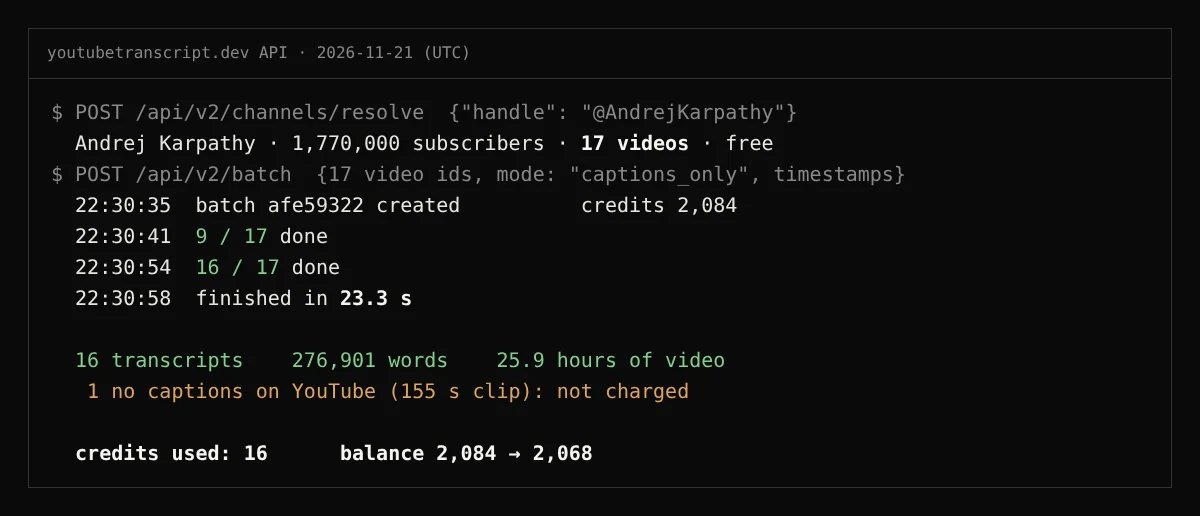 The real run, November 21, 2026 (UTC), through the YouTubeTranscript.dev API.
| What we measured | Result |
|---|---|
| Videos on the channel | 17 |
| Transcripts returned | 16, all with timestamps |
| Length of those 16 videos | 25.9 hours |
| Words | 276,901 |
| Time from request to the last transcript | 23.3 seconds, one batch |
| Credits | 16 (1 per transcript) |
| Not charged | 1 video with no captions on YouTube |
How we measured: we listed the channel's videos with our API (free), then sent all 17 to one batch at 22:30:35 UTC. The time is from the batch's own created and completed timestamps. Words are counted on the returned text. Credits are our balance before (2,084) and after (2,068).
Which videos came back empty, and why?
Five of the 17 videos are short "Stable diffusion dreams" clips: music over generated images, with almost no speech.
- One had no captions at all (a 155-second clip). It came back marked "no captions", and we were not charged for it.
- Four had captions with almost nothing in them: 1, 11, 16 and 147 words. That is correct; there is little to say in a music video.
So "every transcript from a channel" really means every video that has speech in it. For a talking channel (lectures, interviews, tutorials) expect nearly all of them. If a video with speech has no captions, you can ask for AI transcription of the audio for that video only, at 1 credit per 2 minutes.
What can I do with a channel's transcripts once I have them?
Search the whole channel for a word. With no AI involved, a plain count across the 16 transcripts shows where each topic lives:
| Word | Times said | In how many videos |
|---|---|---|
| gradient | 405 | 9 |
| transformer | 162 | 9 |
| attention | 142 | 7 |
| tokenizer | 108 | 5 |
Search by idea as well as by spelling. "ChatGPT" appears 0 times. YouTube's automatic captions write it as "chat gpt" (52 times), "chpt" (35), "chipt" (4) and "chpd" (1). If you search a channel's transcripts for a product or a name, try how it sounds, not only how it is spelled.
Ask questions across the whole channel. Hand the transcripts to the AI assistant you use, or to Creator Research, our research app, which reads a channel's videos and answers with links to the exact moment in each one. We did this with 101 videos in Can AI watch YouTube videos for me?
How do I do it on the website or with the API?
On the website. Paste a channel link (youtube.com/@handle) or a playlist link into YouTubeTranscript.dev. The videos go into one job, and the transcripts appear in your history as they finish. More on channels: channel transcripts.
With the API. Two calls: list the channel's videos (free), then send their ids to one batch.
# 1. List the channel's videos (free)
curl https://www.youtubetranscript.dev/api/v2/channels/resolve \
  -H "Authorization: Bearer YOUR_API_KEY" -H "Content-Type: application/json" \
  -d '{"handle": "@AndrejKarpathy"}'

# 2. Send the video ids to one batch, then read the results with GET /api/v2/batch/{batch_id}
curl https://www.youtubetranscript.dev/api/v2/batch \
  -H "Authorization: Bearer YOUR_API_KEY" -H "Content-Type: application/json" \
  -d '{"video_ids": ["EWvNQjAaOHw", "7xTGNNLPyMI"], "format": {"timestamp": true}}'
How many videos one job takes depends on your plan: 10 on Free, 100 on Lite, 500 on Basic, 1,500 on Pro and 3,000 on Business. Playlists take up to 100 videos per request.
How much does a whole channel cost?
1 credit for each video that comes back with a transcript. Videos without captions, failed ones and transcripts you already have are free. Our 17-video channel cost 16 credits. The Free plan gives you 10 credits a month, enough for a small channel; Lite is $5 a month for 500.
Frequently asked questions
Can I download every transcript from a YouTube channel at once?+
Yes. Paste the channel link into YouTubeTranscript.dev, or use the API's channels endpoint, and every video goes into one batch. In our run, Andrej Karpathy's 17 videos came back in 23.3 seconds: 16 transcripts and one video that has no captions on YouTube.
How much does it cost to get a whole channel's transcripts?+
1 credit per video that comes back with a transcript. Videos without captions, failed videos and transcripts you already have are free. Our 17-video channel cost 16 credits. The Free plan gives 10 credits a month; Lite is $5 a month for 500.
How many videos can one channel job take?+
It depends on your plan: up to 10 videos a job on Free, 100 on Lite, 500 on Basic, 1,500 on Pro and 3,000 on Business. Playlists take up to 100 videos per request.
What about videos with no captions?+
They come back marked as having no captions, and you are not charged. You can then ask for AI transcription of the audio for those videos only, at 1 credit per 2 minutes of audio.